


Data Recovery Services USA 2026: Complete Guide to Costs, Providers, and Emergency Recovery Solutions
$15.58 Billion Market by 2034 as American Businesses Battle Ransomware, Accidental Deletion, and Hardware Failures—What You Need to Know
NEW YORK — In an era where a single minute of downtime costs American businesses an average of $5,600, data recovery services have evolved from an IT afterthought to a mission-critical business necessity. As cyberattacks intensify, hardware fails, and human error persists, the data recovery industry is experiencing unprecedented growth—projected to reach $15.58 billion globally by 2034, with North America accounting for 40% of that market.
For American consumers and businesses alike, understanding data recovery services, costs, providers, and prevention strategies has never been more important. This comprehensive guide breaks down everything you need to know about data recovery in 2026, from emergency hard drive recovery to cloud backup solutions, ransomware recovery to deleted file restoration.
The State of Data Loss in America 2026
Staggering Statistics Drive Recovery Demand
The scope of data loss affecting American individuals and organizations in 2026 is nothing short of alarming:
Cybersecurity Threats:
- Amazon Web Services tracked nearly 750 million malicious activities per day in 2025
- Cloudflare mitigated approximately 7.3 million DDoS attacks in Q2 2025 alone
- 16 billion credentials (usernames, emails, passwords) were exposed in the largest compilation ever documented (June 2025)
- United States alone: 18.4 billion leaked data points, including 2.28 billion password exposures
Business Impact:
- Average cost of data breach in healthcare: $7.42 million (2025)
- Average time to identify and contain healthcare breach: 279 days
- Average ransomware recovery cost in USA: $1.91 million
- Only 51% of US organizations fully recovered from ransomware within one week
Employee Data Recovery:
- 70% of employees successfully recover data after malware or phishing incidents
- Average downtime cost: $5,600 per minute
- 60% of organizations believe they can recover within hours
- Only 35% actually achieve that goal (massive perception gap)
Testing Gap:
- Only 15% of businesses tested backups daily in 2025
- Most test weekly, ad-hoc, or not at all
- More than 50% of organizations spend 10+ hours weekly managing backups
These statistics underscore a critical reality: data loss is not a question of “if” but “when”—and most Americans and businesses are woefully unprepared.
What is Data Recovery? Understanding the Basics
Definition and Process
Data recovery is the process of retrieving inaccessible, lost, corrupted, damaged, or formatted data from secondary storage devices, removable media, or files when the data stored cannot be accessed through normal means.
Common Data Recovery Scenarios:
- Hardware Failure
- Hard drive mechanical failure (clicking, grinding sounds)
- Solid-state drive (SSD) controller failure
- RAID array failure
- External drive damage from drops or water
- USB flash drive physical damage
- Logical Failures
- Accidental file deletion
- Partition formatting or deletion
- File system corruption
- Operating system crashes
- Software bugs or conflicts
- Cybersecurity Incidents
- Ransomware encryption
- Malware data corruption
- Phishing-related deletion
- Insider threats
- Advanced persistent threats (APTs)
- Natural Disasters
- Fire damage to storage devices
- Flood or water damage
- Power surges destroying electronics
- Physical destruction from accidents
How Data Recovery Works
Professional data recovery typically follows these stages:
Stage 1: Evaluation
- Technician assesses the device and damage extent
- Determines recovery feasibility (50%-90% success rates typical)
- Provides quote and timeline
- Most reputable companies offer free evaluation
Stage 2: Imaging
- Creates sector-by-sector copy of storage device
- Works from the copy to prevent further damage to original
- Can take hours to days depending on drive size and condition
Stage 3: Recovery
- Uses specialized software to scan for recoverable files
- Reconstructs file systems and directories
- Extracts recoverable data to new storage medium
- Verifies file integrity
Stage 4: Delivery
- Returns recovered data on external drive, cloud upload, or secure download
- Provides detailed report of recovered vs. unrecoverable files
- Securely destroys or returns original device per customer preference
Data Recovery Services: Types and Providers
Professional Data Recovery Companies
The United States hosts numerous professional data recovery firms, ranging from local shops to national chains with cleanroom facilities.
Top National Data Recovery Companies (2026):
1. DriveSavers Data Recovery
- Location: Novato, California (serving all 50 states)
- Specialization: Hard drives, SSDs, RAID arrays, mobile devices
- Facilities: ISO 5 Class 100 cleanrooms
- Turnaround: 24-48 hour emergency service available
- Success Rate: 90%+ claimed
- Pricing: $300-$3,900+ depending on device and service level
- Certifications: SOC 2 Type II, SSAE-18 compliant
2. Secure Data Recovery Services
- Locations: 15+ facilities nationwide
- Specialization: Enterprise servers, databases, virtual machines
- Notable: Veteran-owned business
- Turnaround: Same-day emergency service in major cities
- Success Rate: 96% claimed (among highest in industry)
- Pricing: $500-$3,500+ typical range
- Certifications: SSAE-18, SOC 2 Type II
3. Ontrack Data Recovery
- Parent Company: KLDiscovery (publicly traded)
- Global Presence: Serving USA with international R&D
- Specialization: Complex RAID, NAS, SAN systems
- Technology: 35+ years developing proprietary recovery tools
- Turnaround: Standard (5-7 days) to Emergency (24-48 hours)
- Pricing: $695-$2,900+ typical
- Notable: Handles Fortune 500 enterprise recoveries
4. ACE Data Recovery
- Location: New York and Texas facilities
- Specialization: Mac systems, Apple devices, Linux servers
- Services: Also offers in-lab forensics
- Turnaround: 2-5 business days standard
- Success Rate: 98% for logical failures, 85% for physical
- Pricing: $350-$2,700 typical
- Notable: Family-owned since 1981
5. Gillware Data Recovery
- Location: Madison, Wisconsin
- Specialization: Consumer-friendly pricing, transparent process
- Unique Offering: “No data, no charge” guarantee
- Turnaround: 5-10 business days standard
- Pricing: $300-$1,800 (generally lower than competitors)
- Notable: Heavy focus on customer education and service
Local vs. National Providers
Local Data Recovery Shops:
Advantages:
- Face-to-face consultation
- Potentially faster turnaround for simple recoveries
- Support local business
- May offer pickup/delivery services
Disadvantages:
- Often lack cleanroom facilities for physical recoveries
- Limited tools and expertise for complex cases
- May outsource to national labs (adding cost and time)
- Inconsistent quality and certifications
National Providers:
Advantages:
- State-of-the-art cleanroom facilities (ISO 5 Class 100 standard)
- Proprietary recovery tools developed over decades
- Specialists for specific device types
- Certifications and compliance (HIPAA, SOC 2, etc.)
- “No data, no recovery fee” policies common
Disadvantages:
- Higher costs for premium services
- Shipping time adds to overall turnaround
- Less personal interaction
- Some advertise nationally but lack true expertise
DIY Data Recovery Software
For logical failures (accidental deletion, formatting) where hardware remains functional, DIY software can work:
Consumer Data Recovery Software (2026):
Stellar Data Recovery
- Price: $79.99 (Standard), $99.99 (Professional)
- Platforms: Windows, Mac
- Success Rate: Good for recently deleted files
- Limitation: Cannot recover from physically damaged drives
EaseUS Data Recovery Wizard
- Price: $69.95 (Pro), $149.95 (Technician)
- Platforms: Windows, Mac
- Free Version: Recovers up to 2GB
- Strength: User-friendly interface
R-Studio
- Price: $79.99 (Home), $999 (Corporate)
- Platforms: Windows, Mac, Linux
- Strength: Advanced features for tech-savvy users
- Weakness: Steeper learning curve
Disk Drill
- Price: $89 (Pro), $499 (Enterprise)
- Platforms: Windows, Mac
- Free Version: 500MB recovery limit
- Strength: Good for Mac users
Recuva (by Piriform)
- Price: Free (basic), $19.95 (Professional)
- Platform: Windows only
- Strength: Completely free option available
- Limitation: Less powerful than paid alternatives
Critical Warning About DIY Recovery:
Attempting DIY recovery on physically damaged drives (clicking sounds, not spinning, not recognized by computer) can cause permanent, irreversible data loss. If hardware damage is suspected, immediately stop using the device and consult professionals.
Every additional power-on cycle and access attempt degrades damaged drives further, reducing professional recovery chances from 90% to 10% or even 0%.
Data Recovery Costs: What Americans Pay in 2026
Pricing Structure Breakdown
Data recovery costs vary dramatically based on several factors:
Typical Price Ranges by Failure Type:
Logical Failures (Software Issues):
- Simple Deletion Recovery: $300-$700
- Formatted Drive Recovery: $500-$1,200
- Corrupted File System: $700-$1,500
- Virus/Malware Damage: $800-$1,800
Physical Failures (Hardware Damage):
- Minor Physical Damage: $700-$1,400
- Moderate Physical Damage: $1,400-$2,500
- Severe Physical Damage (cleanroom work): $2,500-$3,900+
- Fire/Water Damage Recovery: $2,000-$5,000+
RAID and Server Recovery:
- RAID 0/1 Recovery: $1,500-$3,000
- RAID 5/6 Recovery: $2,500-$5,000
- Complex RAID 10/50/60: $5,000-$10,000+
- SAN/NAS Enterprise Systems: $7,500-$15,000+
Mobile Device Recovery:
- iPhone/Android (logical): $300-$900
- iPhone/Android (physical damage): $900-$2,500
- Tablet Recovery: $500-$1,800
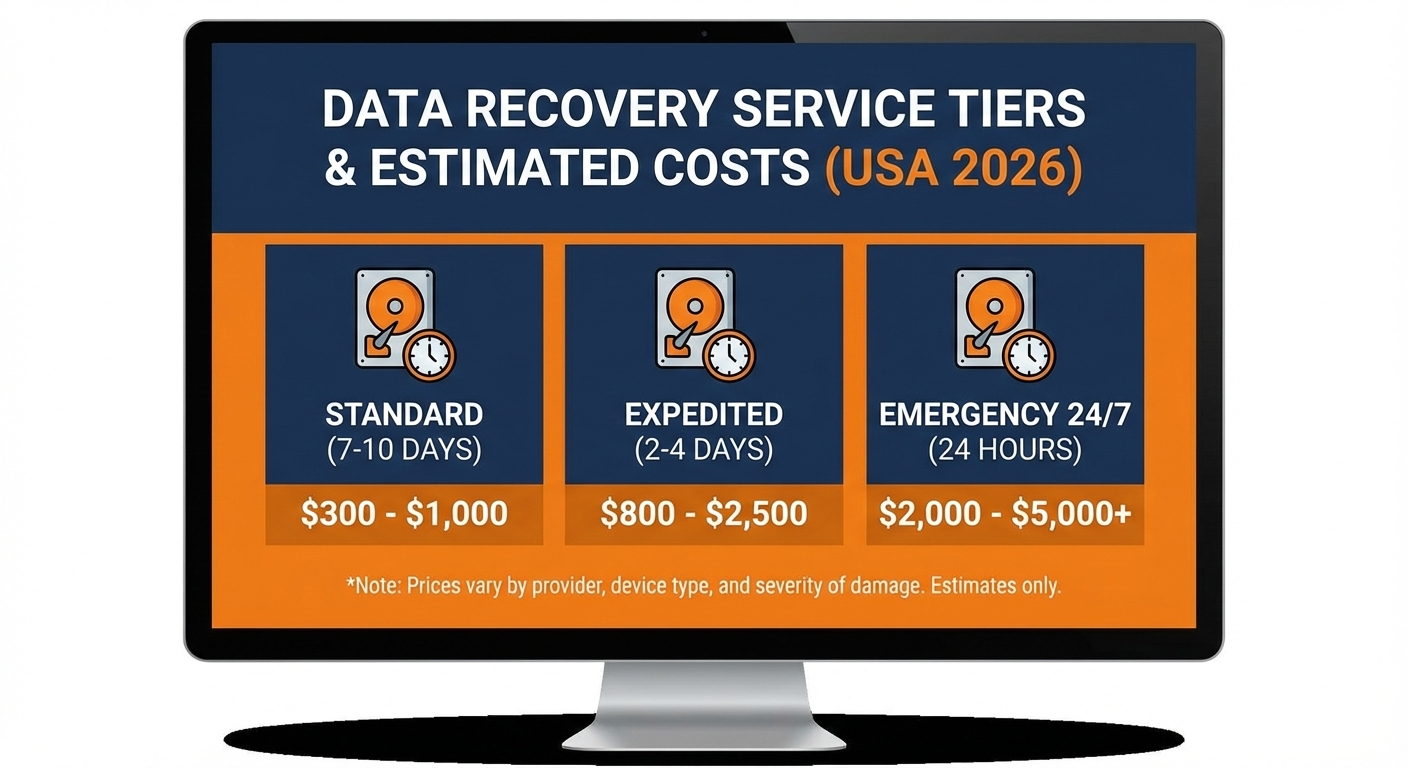
Expedited Service Fees:
- Standard Service: Base price (5-10 business days)
- Priority Service: +50% ($300-$700 extra) for 2-3 day turnaround
- Emergency Service: +100-150% ($700-$1,500+ extra) for 24-48 hour turnaround
Factors Affecting Cost
1. Storage Device Type:
- Traditional hard drives (HDD): Generally least expensive
- Solid-state drives (SSD): More expensive due to complexity
- NVMe drives: Higher cost due to specialized tools needed
- RAID arrays: Exponentially more expensive
2. Damage Severity:
- Level 1 (Logical): Least expensive, no hardware damage
- Level 2 (Minor Physical): Moderate cost, some parts replacement
- Level 3 (Major Physical): High cost, extensive cleanroom work required
- Level 4 (Catastrophic): Highest cost, may be unrecoverable
3. Data Value/Urgency:
- Standard turnaround (5-10 days): Base pricing
- Same-week service: +30-50% premium
- 24-48 hour emergency: +100-150% premium
- On-site recovery: +200-300% for enterprise
4. Drive Capacity:
- Under 1TB: Base price
- 1-4TB: +15-25%
- 4-10TB: +25-40%
- 10TB+: +40-60% or custom quote
Hidden Costs to Watch For
Evaluation/Diagnostic Fees: Most reputable companies offer free evaluation, but some charge $50-$200 which may or may not apply toward recovery costs. Always confirm evaluation is free before shipping device.
Return Shipping: Companies typically provide free shipping TO their facility but may charge $30-$75 to return your device and recovered data.
Media Costs: Recovered data is typically delivered on an external hard drive. Some companies include this ($0-$50 value) while others charge $75-$150 for the drive.
Failed Recovery Fees: Reputable companies follow “no data, no charge” policy. Avoid companies that charge full or partial fees even if recovery fails.
Storage Fees: Some companies charge $50-$100/month if you don’t retrieve your recovered data within 30-90 days.
The Ransomware Crisis: Recovery vs. Paying
Ransomware by the Numbers
Ransomware attacks targeting American businesses and individuals have become epidemic:
2025 Statistics:
- FBI Internet Crime Complaint Center received 2,825 ransomware complaints
- Average ransom demand: $4.3 million (up from $2.1 million in 2023)
- Average ransom payment (those who paid): $1.54 million
- Average recovery cost without paying: $1.91 million
- Only 51% of US organizations achieved full recovery within one week
Should You Pay the Ransom?
Law enforcement, cybersecurity experts, and data recovery professionals universally advise DO NOT PAY for these reasons:
Why Not to Pay:
- No Guarantee of Decryption
- 30-40% of victims who pay never receive working decryption keys
- Even with key, decryption can corrupt or delete files
- Criminals may demand additional payments
- Funds Criminal Operations
- Paying ransoms directly funds organized crime
- Encourages future attacks on you and others
- May violate US sanctions if paying state-sponsored groups
- You Become a Repeat Target
- Paying marks you as willing victim
- 80% of victims who pay are targeted again within months
- Second attack typically demands higher ransom
- Legal and Regulatory Issues
- Some ransomware groups are sanctioned entities (OFAC violations)
- Paying can result in federal fines
- May violate cyber insurance policy terms
Alternatives to Paying:
- Professional Ransomware Recovery Services
- Companies like Coveware, Group-IB specialize in ransomware
- May have decryption keys for known ransomware variants
- Can restore from shadow copies Windows creates automatically
- Costs $2,000-$15,000 but avoids paying criminals
- Restore from Backups
- If you have recent backups not connected to network
- Wipe infected systems completely, restore from clean backup
- Requires backups made within days/weeks of attack
- Free Decryption Tools
- No More Ransom Project (Europol) offers free decryptors
- Emsisoft, Kaspersky, Avast provide free tools
- Only works for some older ransomware variants
- Check https://www.nomoreransom.org/
- Report to FBI
- File report with FBI Internet Crime Complaint Center (IC3)
- FBI may have decryption keys from prior investigations
- Helps law enforcement track and combat ransomware groups
Data Backup: The Best Data Recovery is Prevention
The 3-2-1 Backup Rule
Data recovery experts universally recommend the 3-2-1 backup strategy:
3 Copies of Your Data:
- 1 primary copy (your working files)
- 2 backup copies
2 Different Media Types:
- Internal/external hard drive
- Cloud storage
- NAS device
- Tape backup
1 Copy Offsite:
- Cloud storage
- External drive stored at different location
- Relative’s or friend’s house
- Safety deposit box
Consumer Backup Solutions (2026)
Cloud Backup Services:
Backblaze Personal Backup
- Price: $9/month or $99/year (unlimited storage)
- Platforms: Windows, Mac
- Pros: Unlimited backup, automatic, affordable
- Cons: Doesn’t backup network drives or external drives unless connected
IDrive
- Price: $79.50/year (5TB), $99.50/year (10TB)
- Platforms: Windows, Mac, iOS, Android, Linux
- Pros: Very affordable per TB, backs up unlimited devices
- Cons: Less intuitive interface
Carbonite
- Price: $89.99/year (unlimited)
- Platforms: Windows, Mac
- Pros: Automatic background backup
- Cons: Slow initial backup, no Linux support
CrashPlan for Small Business
- Price: $12/month per computer (unlimited storage)
- Platforms: Windows, Mac, Linux
- Pros: Unlimited backup, includes versioning
- Cons: No consumer version anymore
Local Backup Solutions:
External Hard Drives:
- WD My Passport (2TB-5TB): $60-$120
- Seagate Backup Plus (1TB-5TB): $50-$110
- Pros: Fast, one-time cost, no internet required
- Cons: Can fail, theft/fire risk
Network Attached Storage (NAS):
- Synology DiskStation DS224+: $300 + drives
- QNAP TS-264: $350 + drives
- Pros: Multiple drive redundancy, accessed from any device
- Cons: Higher upfront cost, requires setup knowledge
Business Backup Solutions
Backup-as-a-Service (BaaS) Providers:
Veeam Backup & Replication
- Target: SMBs to Enterprise
- Pricing: Starts at $660/year for 10 workstations
- Strength: Industry-leading virtual machine backup
- 2026 Innovation: AI-powered anomaly detection for ransomware
Acronis Cyber Protect
- Target: MSPs and businesses
- Pricing: $75-$120 per device annually
- Strength: Anti-malware integrated with backup
- Notable: Advanced anti-ransomware protection
Druva
- Target: Mid-market to enterprise
- Pricing: Custom (typically $80-$150/user/year)
- Strength: SaaS backup (Microsoft 365, Google Workspace)
- Cloud-Only: No on-premise infrastructure needed
Cohesity
- Target: Enterprise
- Pricing: Custom (significant investment)
- Notable: Acquired Veritas data protection unit (Feb 2024)
- Strength: Data management beyond just backup
Emerging Trends in Data Recovery (2026)
AI-Powered Recovery and Anomaly Detection
One of the most significant shifts in 2026 is artificial intelligence integration into backup and recovery systems:
AI Capabilities:
1. Predictive Failure Analysis
- AI monitors S.M.A.R.T. (Self-Monitoring, Analysis and Reporting Technology) data
- Predicts drive failures 7-14 days before occurrence
- Alerts users to backup immediately before loss
- Reduces catastrophic failures by 60-70%
2. Ransomware Detection
- Machine learning identifies unusual file modification patterns
- Detects encryption attempts in real-time
- Automatically triggers immutable snapshots
- Can identify ransomware before human awareness
3. Searchable Backup Data
- AI indexes backup content (historically unsearchable)
- Search for sensitive data like PII, credit cards, SSNs
- Compliance and governance benefits
- Transforms backups from “data grave” to active asset
4. Intelligent Recovery Prioritization
- AI determines which files/databases to restore first
- Minimizes downtime by recovering critical systems immediately
- Learns from past recovery patterns
- Reduces recovery time by 40-60%
Example: Veeam’s January 2026 Launch
Veeam Software unveiled an expanded cloud-native backup platform with integrated AI-powered anomaly detection that:
- Identifies early signs of ransomware
- Automates recovery workflows for hybrid environments
- Reduces detection-to-recovery time from hours to minutes
- Has been implemented by 30% of enterprises already
Immutable Backups: Ransomware-Proof Storage
What Are Immutable Backups?
Immutable backups are “write once, read many” (WORM) backups that cannot be altered or deleted for a specified retention period—even by system administrators.
How They Protect Against Ransomware:
- Ransomware Cannot Encrypt Them
- Even if attacker gains full system access
- Immutable snapshots remain pristine
- Guaranteed clean restore point exists
- Insider Threats Neutralized
- Malicious employee cannot delete backups
- Disgruntled admin cannot sabotage recovery
- Accidental deletion impossible
- Compliance Benefits
- Meets regulatory requirements (HIPAA, SOX, PCI-DSS)
- Proves data integrity for audits
- Legal hold capabilities
Technology Providers:
- Infinidat InfiniSafe: First built-in cyber detection in primary storage
- Cohesity DataProtect: Immutable snapshots with ransomware recovery
- Rubrik: Immutable backups with instant recovery (1-minute guarantee)
- AWS S3 Object Lock: Cloud-based immutable storage
- Azure Immutable Blob Storage: Microsoft’s immutable cloud option
Cost Considerations:
Immutable backup solutions typically add 15-30% to backup infrastructure costs but can save millions in ransomware recovery expenses.
Cloud-Native and Hybrid Backup
The Shift to Cloud:
By 2026, 50% of new backup deployments are cloud-based or hybrid, up from 30% in 2023.
Advantages of Cloud Backup:
- Geographic Redundancy
- Data replicated across multiple regions automatically
- Protection against regional disasters (hurricanes, earthquakes)
- Meets business continuity requirements
- Infinite Scalability
- Pay only for storage used
- No capacity planning required
- Instant scale-up during growth periods
- Reduced Capital Expenditure
- No hardware purchases
- No data center space needed
- Predictable monthly costs vs. large upfront investment
- Automatic Updates
- Software always current
- Security patches applied immediately
- No maintenance windows
Hybrid Approach:
Most enterprises adopt hybrid backup:
- Local backup for speed: Fast recovery of recent data
- Cloud backup for protection: Offsite copy for disaster recovery
- Best of both worlds: Balance performance and protection
Example: Microsoft Azure Backup (March 2025 Update)
Microsoft expanded Azure Backup with:
- SLA-backed geo-redundant recovery options
- Native Microsoft 365 protection
- 99.9% availability guarantee
- Automated policy management
Industry-Specific Data Recovery Considerations
Healthcare Data Recovery
Unique Challenges:
- HIPAA Compliance: All recovery must maintain patient data confidentiality
- Life-Critical Data: Patient records directly impact health outcomes
- Highest Breach Costs: $7.42 million average (24% of healthcare breaches)
- Longest Recovery Times: 279 days average to identify and contain breach
Specialized Healthcare Recovery Providers:
Recovery companies serving healthcare must be:
- HIPAA/HITECH Act compliant
- BAA (Business Associate Agreement) signed
- SOC 2 Type II certified
- Experienced with EHR systems (Epic, Cerner, Meditech)
Healthcare Backup Requirements:
- Daily backups minimum (preferably continuous)
- 7-year retention for medical records
- Encrypted backups (AES-256 standard)
- Regular disaster recovery drills (quarterly minimum)
- Geographically redundant storage
Financial Services Data Recovery
Regulatory Requirements:
- Sarbanes-Oxley (SOX): 7-year retention of financial records
- PCI DSS: Strict cardholder data protection and recovery
- SEC Rule 17a-4: WORM storage for broker-dealers
- FINRA: Business continuity plan with tested recovery
Recovery Time Objectives (RTO):
Financial services demand aggressive RTOs:
- Tier 1 Systems (Trading): 0-4 hour RTO
- Tier 2 Systems (Customer Service): 4-24 hour RTO
- Tier 3 Systems (Back Office): 24-72 hour RTO
Cost of Downtime:
For financial institutions, downtime costs are astronomical:
- Trading systems: $100,000-$1 million per hour
- Online banking: $250,000-$500,000 per hour
- ATM networks: $50,000-$100,000 per hour
Legal and E-Discovery Data Recovery
Litigation Hold Requirements:
When litigation is anticipated, organizations must:
- Preserve all potentially relevant data
- Prevent deletion of held data
- Recover deleted data from backup if relevant
- Prove data integrity and chain of custody
E-Discovery Recovery Specialists:
Companies like Ontrack and DriveSavers offer specialized services:
- Forensically sound recovery (admissible in court)
- Chain of custody documentation
- Expert witness testimony
- Support for litigation holds
Costs:
E-discovery recovery is significantly more expensive:
- Standard recovery: $500-$2,500
- Forensic recovery: $2,000-$10,000+
- Expert witness testimony: $300-$500 per hour
- Court-ready documentation: $1,000-$5,000 additional
DIY Data Recovery: When and How
When DIY Recovery Makes Sense
Attempt DIY Recovery If:
- Logical Failure Only
- Accidentally deleted files
- Formatted drive (no physical damage)
- Corrupted partition table
- Operating system won’t boot (but drive spins normally)
- Recent Data Loss
- Less than 24 hours since deletion
- Drive hasn’t been extensively used since loss
- No new files written to drive
- Non-Critical Data
- Personal photos/videos
- Replaceable documents
- Data you can afford to lose permanently if DIY fails
NEVER Attempt DIY If:
- Physical Damage Suspected
- Clicking, grinding, or beeping sounds
- Drive not spinning or recognized by computer
- Dropped or water-damaged drive
- Burnt smell or visible damage
- Critical Business Data
- Only copy of financial records
- Irreplaceable client information
- Legal documents under litigation hold
- RAID Array Failure
- Multiple drive failures
- Controller card issues
- Rebuilding attempt failed
The Golden Rule:
If data is worth more than $300-$500 to you, skip DIY and go directly to professionals. DIY attempts on damaged drives permanently destroy 40-60% of otherwise recoverable data.
DIY Recovery Step-by-Step
For Accidentally Deleted Files:
Step 1: Stop Using the Drive Immediately
- Every additional file saved reduces recovery chances
- Don’t install recovery software on the affected drive
- Use a different computer if possible
Step 2: Download Recovery Software
- Download to a different drive (not the one with lost files)
- Recommended: Recuva (free), EaseUS Data Recovery Wizard, Disk Drill
Step 3: Scan the Drive
- Run “Deep Scan” (takes 2-8 hours depending on drive size)
- Software will show recoverable files with success probability
Step 4: Recover to Different Drive
- NEVER recover files back to the same drive
- Use external drive or different partition
- Preview files before recovery (photos, documents)
Step 5: Verify Recovered Files
- Open files to confirm they work
- Some files may be partially corrupted
- Multiple recovery attempts reduce success rates
Success Rates for DIY:
- Files deleted <24 hours ago: 80-95% recovery
- Files deleted 1-7 days ago: 50-80% recovery
- Files deleted >7 days ago: 20-50% recovery
- Formatted drive: 40-70% recovery (depends on format type)
Choosing a Data Recovery Service: Buyer’s Guide
Red Flags to Avoid
Warning Signs of Disreputable Companies:
- Guaranteed 100% Recovery
- No legitimate company guarantees 100%
- Physical damage makes some data permanently unrecoverable
- Claims of 100% success are fraudulent
- Upfront Payment Required
- Reputable companies follow “no data, no charge”
- Never pay before seeing recovered file list
- Evaluation should be free
- Pressure Tactics
- “Act now or data will be permanently lost”
- “Limited time discount expiring today”
- Legitimate companies don’t use urgency manipulation
- No Certifications or Facility Details
- Won’t show cleanroom facility
- No SOC 2, SSAE-18, or ISO certifications
- Can’t provide references or case studies
- Outsourcing Without Disclosure
- Local shop that outsources to actual recovery lab
- Adds markup and delays without adding value
- Won’t disclose actual recovery facility
Questions to Ask Before Hiring
1. What is your success rate for my specific drive type and failure?
- Should provide data for exact scenario (SSD vs HDD, physical vs logical)
- Overall success rates misleading (includes easy recoveries)
2. Do you have cleanroom facilities? What class?
- ISO 5 Class 100 is industry standard
- Ask for photos or virtual tour
- Local shops often lack cleanrooms
3. What certifications do you hold?
- SOC 2 Type II (security auditing)
- SSAE-18 (service organization controls)
- ISO 9001 (quality management)
- HIPAA/HITECH (if healthcare data)
4. What is your no data, no charge policy?
- Clarify what “no data” means (0% vs 50% vs 90% recovery)
- Understand evaluation fees
- Get written quote with policy
5. How do you handle data security and chain of custody?
- Encryption during transit and storage
- Background checks on technicians
- Surveillance in facilities
- Data destruction after recovery
6. What is included in your quote?
- Return shipping?
- External drive for recovered data?
- Failed recovery fees?
- Media destruction?
7. What are my turnaround options and costs?
- Standard timeline
- Priority service premium
- Emergency service premium
- After-hours availability
8. Can you provide customer references?
- Recent clients with similar recovery needs
- Testimonials and reviews
- Better Business Bureau rating
The Future of Data Recovery (2026-2030)
Emerging Technologies
1. Quantum Data Storage Recovery
As quantum computers become more prevalent, quantum data storage will require entirely new recovery methodologies. Early research suggests quantum storage will be more resilient but also more complex to recover.
2. DNA Data Storage Recovery
Microsoft and Twist Bioscience have successfully stored and recovered data in synthetic DNA. While still experimental, DNA storage could revolutionize long-term archival—but recovery processes will differ drastically from conventional methods.
3. AI-Driven Predictive Maintenance
By 2030, AI systems will predict drive failures so accurately that catastrophic data loss becomes rare. Proactive data migration before failure eliminates need for emergency recovery services.
4. Blockchain-Verified Data Integrity
Blockchain technology ensures recovered data hasn’t been tampered with, critical for legal and compliance purposes. Hash verification on blockchain provides tamper-proof audit trail.
Market Projections
Global Data Recovery Market Growth:
- 2024: $3.82 billion
- 2026: $7.38 billion (projected)
- 2032: $8.03 billion
- 2034: $15.58 billion (projected)
- CAGR: 9.8% through 2034
North American Market:
- Currently holds 40% global market share
- Projected to maintain dominance through 2034
- Driven by strict compliance regulations (SOX, PCI-DSS, HIPAA)
- Cloud adoption accelerating BaaS growth
Key Growth Drivers:
- Exponential data generation (149 zettabytes in 2024)
- Increasing cybersecurity threats (ransomware, APTs)
- Regulatory compliance requirements
- Cloud and hybrid infrastructure adoption
- IoT device proliferation generating massive data volumes
Conclusion: Your Data Recovery Action Plan
Data loss will happen—the only question is whether you’ll be prepared. Here’s your action plan:
For Consumers:
- Implement 3-2-1 Backup Rule (3 copies, 2 media types, 1 offsite)
- Use Automatic Cloud Backup ($9-$12/month for unlimited)
- Keep External Drive Disconnected (protection against ransomware)
- Test Restore Monthly (verify backups actually work)
- Research Data Recovery Company NOW (don’t wait for emergency)
For Businesses:
- Deploy Enterprise Backup Solution (Veeam, Acronis, Druva)
- Implement Immutable Backups (ransomware protection)
- Define RTO/RPO for Each System (know what you can tolerate)
- Test Disaster Recovery Quarterly (don’t assume it works)
- Establish Relationship with Data Recovery Provider (vet them before crisis)
- Train Employees on Backup Best Practices (human error causes 25% of loss)
- Review Cyber Insurance Policy (understand coverage limits)
Remember:
- Every minute of delay after data loss reduces recovery chances
- Physical damage requires immediate professional intervention
- Ransomware victims should NEVER pay without exhausting alternatives
- The best data recovery is prevention through comprehensive backup
- Free evaluation from reputable companies—always confirm before shipping
In 2026’s data-driven world, your photos, documents, business records, and digital life are too valuable to leave unprotected. Take action today—before disaster strikes tomorrow.
Data Recovery Resources
Government Resources:
- FBI Internet Crime Complaint Center: https://www.ic3.gov (report ransomware)
- No More Ransom Project: https://www.nomoreransom.org (free decryption tools)
- CISA Cybersecurity Resources: https://www.cisa.gov/stopransomware
Professional Associations:
- International Association of Computer Investigative Specialists (IACIS)
- HTCIA (High Technology Crime Investigation Association)
Backup Calculator Tools:

